

A cost alert can tell you that estimated AWS spend crossed a threshold. It may not tell you quickly enough to stop a workload that is creating billable usage right now.
That gap matters. A retry loop, recursive event trigger, runaway batch, or unbounded scaling path can keep consuming resources while a billing dashboard is still catching up. If a workload adds an illustrative $120 per hour and runs for eight hours before anyone can contain it, that is $960 of additional usage. The example is simple; real costs depend on the services, Regions, and pricing involved.
The answer is not to discard budgets or anomaly detection. Keep them for financial visibility and follow-up. Put a separate safety loop closer to the workload: one that watches runtime behavior and can pause or limit a known workload before billing data is ready.
The design principle: use runtime signals to contain dangerous behavior; use billing signals to understand and manage its financial impact.
Why billing alerts cannot be your emergency brake
AWS billing data is not a live meter. AWS says the billing data used by Budgets is updated at least once per day. Cost Anomaly Detection uses Cost Explorer data, which can take up to 24 hours to become available; after billing data is processed, anomaly detection runs approximately three times a day. The exact time to an alert varies, but neither feature should be treated as a guaranteed real-time stop mechanism. AWS Budgets best practices · Cost Anomaly Detection
AWS Budgets can also start actions at configured thresholds. Depending on the action, those can apply an IAM policy or service control policy (SCP), or target selected EC2 or RDS instances. These actions are useful as a backstop, but they still depend on budget evaluation and the permissions and scope you configure. They do not replace runtime controls designed around a specific workload. Configuring budget actions
Think of billing tools as the financial ledger and runtime monitoring as the smoke detector. You need both; they answer different questions.
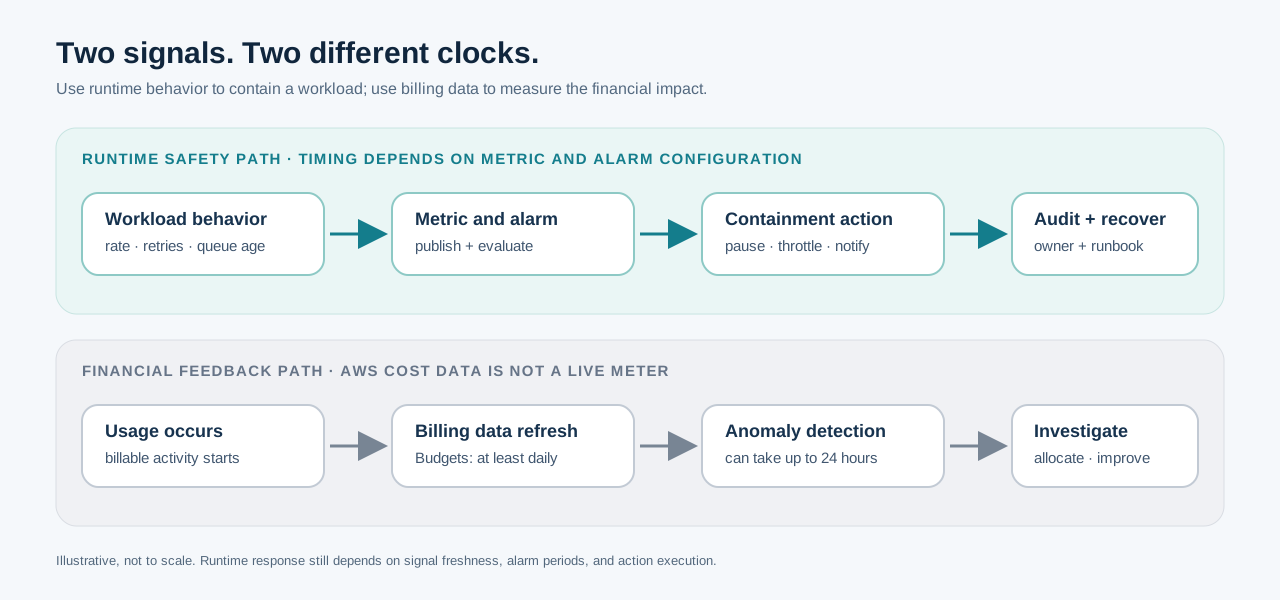
Illustrative only: the runtime path can react closer to the workload, but it has no fixed response time. The billing path follows AWS cost-data refresh and anomaly-detection processing.
What a runaway workload looks like
Runaway spend often starts as normal behavior with a missing boundary:
- A failed task retries without a meaningful limit or backoff.
- A workflow writes an output that triggers the same workflow again.
- A queue consumer scales up faster than downstream systems can handle.
- A batch job has no cap on items, duration, or parallel workers.
- A process repeatedly creates data, logs, snapshots, or other billable resources.
The shared pattern is unbounded repetition or growth. A monthly budget may reveal the cost after it accumulates. A workload-level limit can stop the behavior that is producing it.
A layered design for faster containment
Use several defenses because no single guardrail covers every failure mode.
| Layer | What it limits or detects | Example |
|---|---|---|
| Organization guardrails | Which actions or Regions principals can use | SCPs that restrict approved Regions or high-risk actions |
| Workload boundaries | How much work one execution can do | Maximum runtime, item count, retry count, or concurrency |
| Runtime signals | Whether behavior is moving outside its normal envelope | Queue depth, invocation rate, worker concurrency, error/retry rate, or custom work-unit counters |
| Containment | How to stop or slow the specific workload safely | Pause a schedule, reduce worker concurrency, stop a designated batch, or disable a consumer |
| Financial monitoring | How much the behavior affected spend | AWS Budgets, Cost Anomaly Detection, and cost allocation reports |
SCPs are permission guardrails: they set the maximum permissions available to principals in member accounts. They do not set a dollar ceiling. Service quotas constrain particular service resources or operations, but they are also not a universal spend cap. Use them alongside application limits, and check which limits actually apply to each workload. SCP authorization policies · AWS service quotas
Reference architecture
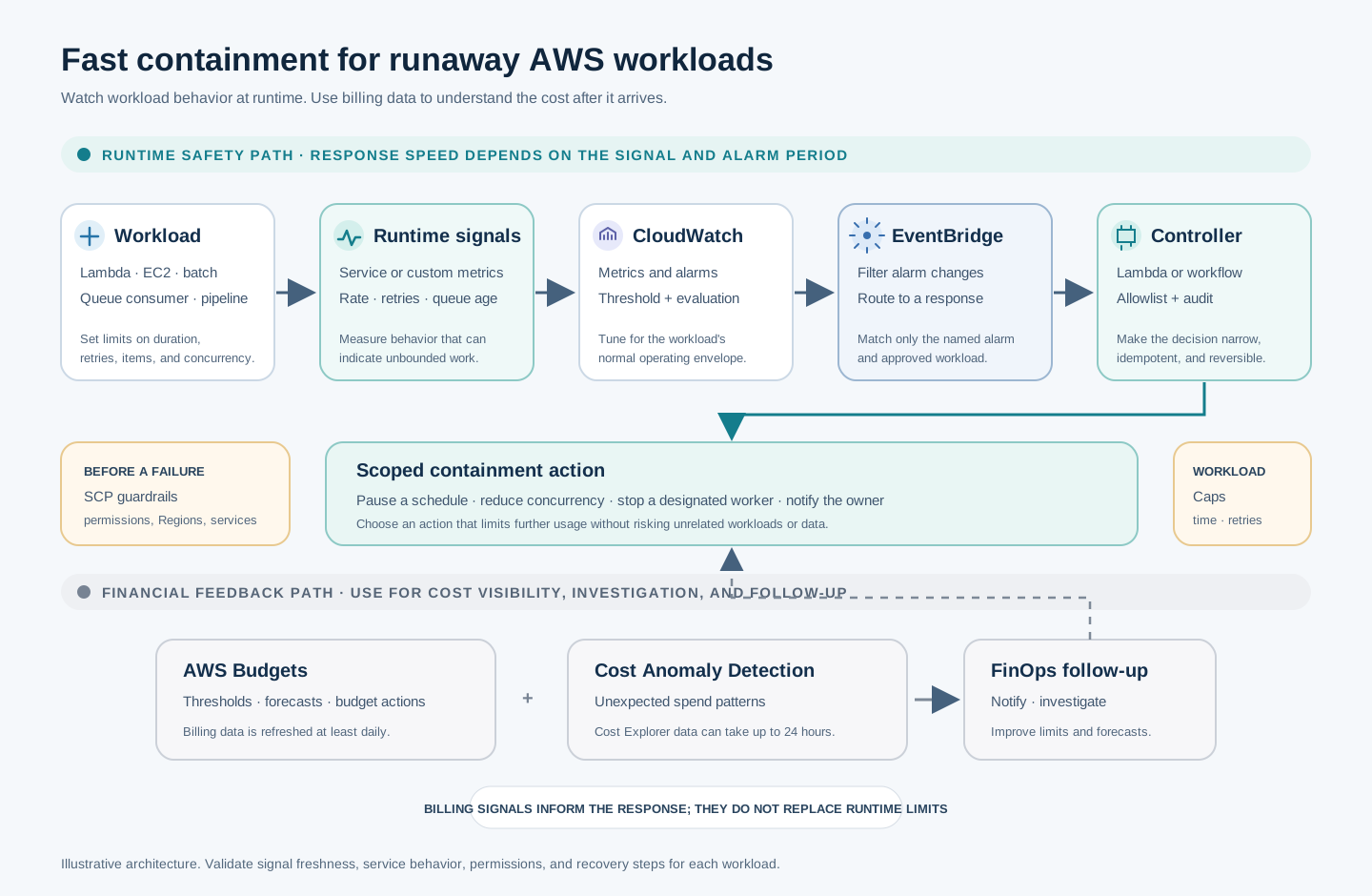
The runtime path reacts to workload signals. The billing path gives finance and platform teams a later view of cost and anomalies. Response speed depends on the selected metric, its publishing interval, and the alarm evaluation period.
The key decision is what signal can identify dangerous behavior soon enough. It might be a native service metric, an application counter, queue age, retry rate, number of processed items, or elapsed runtime. Not every AWS service publishes the metric you need by default, so some workloads need to emit their own counters.
CloudWatch alarm state changes can be routed through EventBridge to trigger a response. That lets you build a small, event-driven controller around a specific workload. CloudWatch alarm events and EventBridge
The controller should only be able to take a small set of approved actions against explicitly identified resources. It should record what triggered the action, what it changed, and how an operator can restore normal operation.
Example: put a ceiling around a batch processor
Consider a batch processor that reads messages from a queue and starts workers. A safer design could include:
- Bound each execution. Set a maximum runtime, a maximum number of work items, and a finite retry policy. Send repeatedly failing messages to a dead-letter queue for investigation rather than retrying forever. Amazon SQS dead-letter queues
- Limit parallel work. Set a concurrency limit appropriate to the downstream system and the workload’s risk. For Lambda, reserved concurrency can define a function’s maximum concurrent executions; throttling may be preferable to unlimited growth, but it can also delay legitimate work. Lambda concurrency
- Watch behavior, not only dollars. Alarm on signals such as sustained queue growth, unusually high retries, concurrency staying at its ceiling, or work units exceeding a configured rate. Choose thresholds from observed normal behavior and test them under load.
- Contain narrowly. On a sustained breach, pause the relevant schedule or event source, reduce concurrency, or stop only a pre-approved non-production worker. Send an alert with the metric, resource, action, and runbook link.
- Review the financial impact later. Use Budgets and Cost Anomaly Detection to identify the cost impact, route it to the owning team, and update estimates or limits if the workload’s expected profile changed.
This design does not promise that all cost growth stops instantly. CloudWatch signals have publication and evaluation periods, and a containment action takes time to execute. The goal is to make the response proportional to the workload and much closer to the behavior that is causing the risk than a billing-only alert can be.
Make automated containment safe
An automatic action is a production control. Treat it like one:
- Start with alert-only mode. Observe normal patterns and tune thresholds before enabling actions.
- Use a narrow allowlist. Identify the exact workload and resource types the controller may change. Avoid broad account-wide actions for a workload-specific signal.
- Prefer reversible actions. Pause a schedule or reduce concurrency before deleting resources or data.
- Make actions idempotent. Repeated alarm events should not produce conflicting changes.
- Add a cooldown and recovery path. Avoid repeatedly pausing and resuming a workload as metrics fluctuate.
- Keep an audit trail. Record the signal, decision, action result, timestamp, and operator notification.
- Escalate uncertain cases. Require human approval when the action could interrupt customer-facing or business-critical processing.
- Test failure modes. Verify permissions, alarm thresholds, event delivery, response behavior, and recovery in a non-production environment.
For some workloads, the right automated action is simply to stop accepting new work and page the owner. That can be safer than terminating infrastructure or deleting data. Pick a response that limits further exposure while preserving enough evidence to diagnose the cause.
Where AWS Budgets still fit
Keep AWS Budgets and Cost Anomaly Detection enabled. Use them to:
- Notify service owners and FinOps when actual or forecast costs cross a threshold.
- Detect unexpected spend patterns and investigate their likely causes.
- Review cost by account, service, application, or other useful allocation dimensions.
- Trigger carefully scoped budget actions where a delayed financial threshold is still useful.
- Compare the incident’s estimated usage with the workload’s expected operating range.
Then connect the investigation back to runtime controls. If a cost spike came from a queue loop, improve retry behavior and queue alarms. If it came from a batch with too much parallelism, tighten its concurrency and duration limits. The cost signal helps find and prioritize the problem; the workload owner fixes the mechanism.
A practical rollout
- Choose one workload with a clear owner and a plausible runaway failure mode.
- Write down its normal operating envelope: work rate, duration, concurrency, retries, and acceptable backlog.
- Add missing runtime metrics and workload-level limits.
- Create alarms and route them to an alert-only response first.
- Exercise the response in a test environment, including duplicate events and recovery.
- Enable a narrow reversible action, then review every activation.
- Keep Budgets and Cost Anomaly Detection as the financial backstop and use their findings to improve the runtime limits.
The takeaway
A cloud budget is not a circuit breaker. AWS billing and anomaly tools are valuable, but their data arrives on a different schedule from the workload that is generating usage.
To reduce the window of exposure, define what “too much work” means for each important workload, measure it at runtime, and give a tightly scoped controller a safe way to pause or limit that work. Then use billing data to understand the impact and prevent the same failure from returning.