

Automation makes cloud operations faster, but it also lets a mistake repeat at machine speed. A deployment job with broad permissions can change far more than the application it was meant to release. A script using a long-lived access key can keep working long after its original purpose has ended.
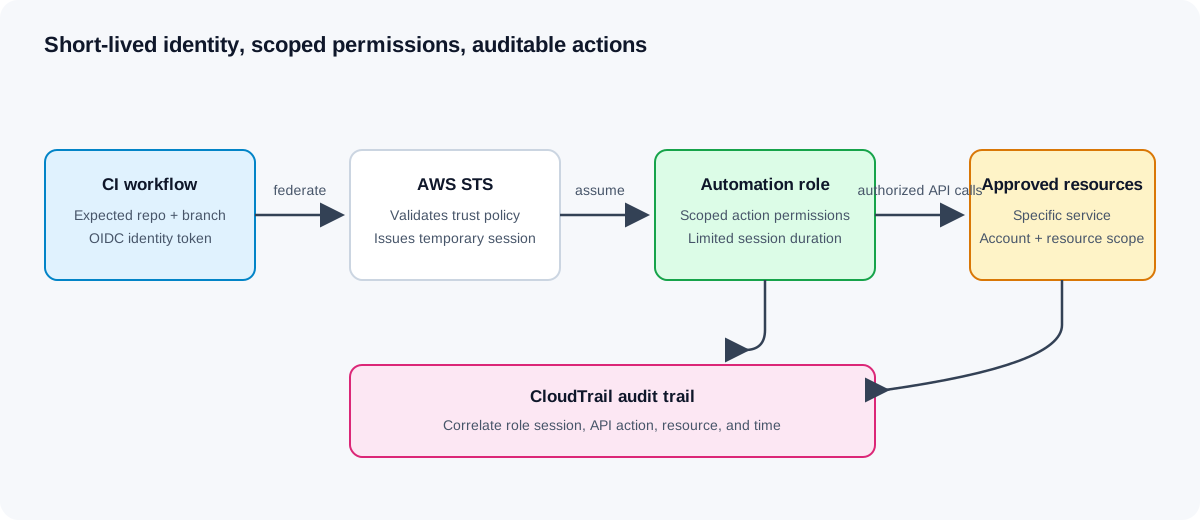
The safer pattern is to give each automation workflow a role it can assume for a short period, with permissions scoped to its specific task. That does not make risk disappear. It makes the identity, permissions, duration, and audit trail easier to reason about.
Start with the automation identity
An AWS IAM role is an identity with permissions that can be assumed by an authorized principal. Unlike a user access key stored in a pipeline, role sessions issue temporary credentials. The trust policy determines who may assume the role; the permissions policy determines what the role may do.
Keeping those questions separate helps during review. A narrow permissions policy does not compensate for a trust policy that lets the wrong workload assume the role, and a precise trust policy does not make an administrator-level permissions policy safe.
For a CI system, prefer its supported federation mechanism, such as OpenID Connect (OIDC), over storing a permanent AWS access key as a repository secret. Restrict the trust to the expected identity provider, audience, repository, and branch or deployment environment. A token from an unrelated repository should not satisfy the role’s trust conditions.
Scope permissions to the job
Write down the exact actions the job performs before writing its policy. A job that uploads versioned release files to one bucket prefix probably does not need permission to administer all S3 buckets, change IAM policies, or manage EC2 instances.
For example, a release uploader might need s3:PutObject on a specific release prefix. It may need additional actions depending on multipart uploads, encryption, or how the workflow verifies an upload. Confirm the required calls from the actual tool and test them in a non-production account; do not add s3:* or Resource: "*" simply to make an access error go away.
Some actions do not support resource-level restrictions, and some permissions require conditions or related resources. Use the AWS Service Authorization Reference to check each action’s resource types and condition keys. When a task needs access to several resource classes, separate statements so each permission has the narrowest practical scope.
Example: trust a specific GitHub Actions workflow branch
This trust-policy fragment is illustrative. Replace the account, organization, repository, and branch values, and follow the current setup instructions from your CI provider:
{
  "Version": "2012-10-17",
  "Statement": [
    {
      "Effect": "Allow",
      "Principal": {
        "Federated": "arn:aws:iam::123456789012:oidc-provider/token.actions.githubusercontent.com"
      },
      "Action": "sts:AssumeRoleWithWebIdentity",
      "Condition": {
        "StringEquals": {
          "token.actions.githubusercontent.com:aud": "sts.amazonaws.com"
        },
        "StringLike": {
          "token.actions.githubusercontent.com:sub": "repo:example-org/example-app:ref:refs/heads/main"
        }
      }
    }
  ]
}
The sub condition is the important boundary in this example: it ties role assumption to one repository and branch. If deployments can originate from several branches or protected environments, express those cases deliberately rather than using a broad wildcard by default.
Separate build, deploy, and runtime permissions
Different stages have different needs. A test job might only run checks and publish a test report. A deployment job might update a specific service. The application itself needs a runtime role for the AWS APIs it calls after deployment. Reusing one powerful role for all three stages expands the impact of a compromised action or dependency.
Keep roles separate where the security boundary differs:
- Give test workflows read-only or artifact-write access where practical.
- Give deployment workflows only the actions needed to release the intended service.
- Give the running application its own runtime role, separate from the deployment identity.
- Constrain
iam:PassRoleto the exact runtime role and service that need it; passing a more privileged role can turn a deployment permission into an escalation path. - Separate production from development identities and trust conditions.
An IAM permissions boundary can set a maximum permission envelope for roles created by a delegated team, but it does not grant permissions by itself. Service control policies can limit permissions available in member accounts, but they also do not grant access. Treat both as guardrails around carefully designed identity and resource policies, not as replacements for them.
Make failures diagnosable without broadening access
Access denied is useful evidence. Identify the exact principal, action, and resource from the failed request and audit event, then determine whether the policy is missing a required permission or the workflow is targeting the wrong resource. Avoid responding by attaching a broad managed policy or adding a wildcard to the first matching statement.
Use IAM Access Analyzer to review external access and policy findings, and use policy validation tools as part of review. CloudTrail provides an audit record of many AWS API calls; use it to understand which assumed role session made a change. Add a meaningful role name and session context so teams can distinguish automation runs during incident investigation.
A review checklist
Before enabling an automation role in production, check:
- Trusted principal: Can only the intended CI identity or AWS service assume this role?
- Trust conditions: Are repository, branch, audience, account, and environment restrictions as specific as practical?
- Actions: Does every allowed API action support the intended task?
- Resources: Are resource ARNs limited to the correct account, Region, and resource scope wherever supported?
- Delegation: Can the role pass another role or change IAM permissions? If so, are those actions tightly constrained?
- Duration: Is the session duration no longer than the workflow reasonably needs?
- Separation: Are build, deployment, and runtime privileges kept distinct where their trust boundaries differ?
- Evidence: Can an operator identify the role session and correlate its actions during an investigation?
- Validation: Has the workflow been tested with both expected actions and an action it must not be allowed to perform?
The takeaway
Secure automation starts with a distinct identity, a narrow trust policy, and permissions that match one job. Prefer short-lived federated role sessions to stored long-lived access keys, and keep deployment rights separate from application runtime rights.
Least privilege is a maintenance practice, not a one-time policy trick. Review permissions when workflows change, use access evidence to remove permissions that are no longer needed, and make broad access an explicit exception with an owner and review date.